
INFINITI Intelligent Key battery discharge

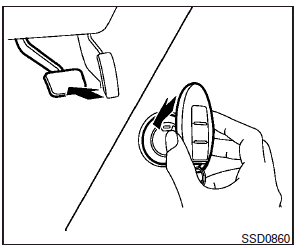
If the battery of the Intelligent Key is discharged, or environmental conditions interfere with the Intelligent Key operation, start the engine according to the following procedure:
1. Place the shift selector in the P (Park) position.
2. Firmly apply the foot brake.
3. Touch the ignition switch with the Intelligent Key as illustrated. (A chime will sound.)
4. Push the ignition switch while depressing the brake pedal within 10 seconds after the chime sounds. The engine will start.
After step 3 is performed, when the ignition switch is pushed without depressing the brake pedal, the ignition switch position will change to ACC.
NOTE:
● When the ignition switch is pushed to the ACC or ON position or the engine is started by the above procedure, the Intelligent Key battery discharge indicator appears in the vehicle information display even when the Intelligent Key is inside the vehicle. This is not a malfunction. To turn off the Intelligent Key battery discharge indicator, touch the ignition switch with the Intelligent Key again.
● If the Intelligent Key battery discharge indicator appears, replace the battery as soon as possible. See “Battery replacement” in the “Maintenance and do-it-yourself” section.
See also:
Environmental factors influence the rate of corrosion
Moisture
Accumulation of sand, dirt and water on
the vehicle body underside can accelerate
corrosion. Wet floor coverings will not dry
completely inside the vehicle, and should
be removed for ...
Cleaning
If your windshield is not clear after using
the windshield washer or if a wiper blade
chatters when running, wax or other
material may be on the blade or windshield.
Clean the outside of the w ...
Vehicle-to-vehicle distance control mode
In the vehicle-to-vehicle distance control mode, the Intelligent Cruise Control (ICC) system automatically maintains a selected distance from the vehicle traveling in front of you according to that ve ...