
Lane camera unit maintenance

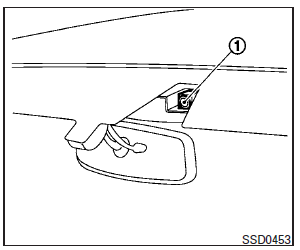
The lane camera unit 1 for the LDW/LDP system is located above the inside mirror. To keep the proper operation of the LDW/ LDP systems and prevent a system malfunction, be sure to observe the following:
● Always keep the windshield clean.
● Do not attach a sticker (including transparent material) or install an accessory near the camera unit.
● Do not place reflective materials, such as white paper or a mirror, on the instrument panel. The reflection of sunlight may adversely affect the camera unit’s capability of detecting the lane markers.
● Do not strike or damage the areas around the camera unit. Do not touch the camera lens or remove the screw located on the camera unit. If the camera unit is damaged due to an accident, contact an INFINITI retailer.
See also:
Audio settings
Audio settings
The display as illustrated will appear when pushing the SETTING button and selecting the “Audio” key.
Bass/Treble/Balance/Fade:
To adjust the speaker tone quality and sound balance ...
Towing a trailer
Your vehicle was designed to be used to carry passengers and cargo. INFINITI does not recommend trailer towing, because it places additional loads on your vehicle’s engine, drivetrain, steering, braki ...
Push-button ignition switch
WARNING
Do not operate the push-button ignition
switch while driving the vehicle except in an
emergency. (The engine will stop when the
ignition switch is pushed 3 consecutive
times or the ...