
Intelligent cruise control system display and indicators

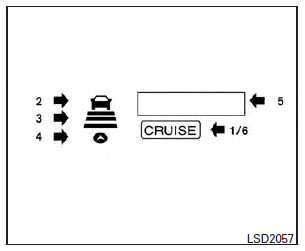
The display is located between the speedometer and tachometer.
1. CRUISE ON/OFF switch indicator:
Indicates that the CRUISE ON/OFF switch is ON.
2. Vehicle ahead detection indicator:
Indicates whether it detects a vehicle in front of you
3. Set distance indicator:
Displays the selected distance between vehicles set with the distance switch.
4. Indicates your vehicle
5. Set vehicle speed indicator:
Indicates the set vehicle speed.
For Canadian models, the speed is displayed in km/h.
6. Intelligent Cruise Control system warning light (orange):
The light comes on if there is a malfunction in the ICC system.
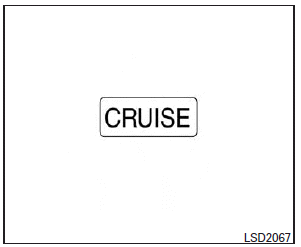
When the ignition switch is placed in the ON position, the indicators come on as illustrated to check for a burned-out bulb, and it turns off when the engine is started.
See also:
When traveling or registering your vehicle in another country
If you plan to travel in another country, you should first find out if the fuel available is suitable for your vehicle’s engine.
Using fuel with too low an octane rating may cause engine damage. All ...
Checking bulbs
With all doors closed, apply the parking brake and place the ignition switch to the ON position without starting the engine. The following lights will come on:
The following lights come on briefl ...
Tachometer
The tachometer indicates engine speed in
revolutions per minute (RPM). Do not rev
the engine into the red zone 1 .
CAUTION
When engine speed approaches the red
zone, shift to a higher gea ...