
Parking/parking on hills

WARNING
● Do not stop or park the vehicle over flammable materials such as dry grass, waste paper or rags. They may ignite and cause a fire.
● Safe parking procedures require that both the parking brake be set and the transmission placed into P (Park). Failure to do so could cause the vehicle to move unexpectedly or roll away and result in an accident. Make sure the shift selector has been pushed as far forward as it can go and cannot be moved without depressing the foot brake pedal.
● Never leave the engine running while the vehicle is unattended.
● Do not leave children unattended inside the vehicle. They could unknowingly activate switches or controls. Unattended children could become involved in serious accidents.
1. Firmly apply the parking brake.
2. Move the shift selector to the P (Park) position.
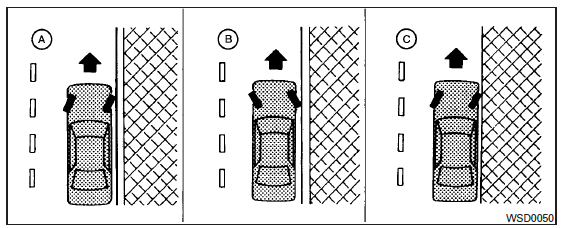
3. To help prevent the vehicle from rolling into traffic when parked on an incline, it is a good practice to turn the wheels as illustrated.
● HEADED DOWNHILL WITH CURB: A
Turn the wheels into the curb and move the vehicle forward until the curb side wheel gently touches the curb.
● HEADED UPHILL WITH CURB: B
Turn the wheels away from the curb and move the vehicle back until the curb side wheel gently touches the curb.
● HEADED UPHILL OR DOWNHILL, NO CURB: C
Turn the wheels toward the side of the road so the vehicle will move away from the center of the road if it moves.
4. Place the ignition switch in the LOCK position.
See also:
Self-test feature
The ABS includes electronic sensors, electric pumps, hydraulic solenoids and a computer. The computer has a built-in diagnostic feature that tests the system each time you start the engine and move th ...
Manual operation (if so equipped)
Manual operation (if so equipped)
Tilt or telescopic operation
Pull the lock lever 1 down and adjust the steering wheel up, down, forward or rearward to the desired position.
Push the lock lever ...
Vehicle identification number (chassis number)
The vehicle identification number is located as shown. ...