
Changing engine oil

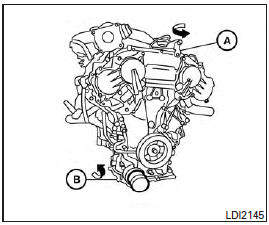
1. Park the vehicle on a level surface and apply the parking brake.
2. Start the engine and let it idle until it reaches operating temperature, then turn it off.
3. Remove the oil filler cap A by turning it counterclockwise.
4. Place a large drain pan under the drain plug B .
5. Remove the drain plug B with a wrench by turning it counterclockwise and completely drain the oil.
If the oil filter is to be changed, remove and replace it at this time. See “Changing engine oil filter” in this section.
● Waste oil must be disposed of properly.
● Check your local regulations.
WARNING
● Prolonged and repeated contact with used engine oil may cause skin cancer.
● Try to avoid direct skin contact with used oil. If skin contact is made, wash thoroughly with soap or hand cleaner as soon as possible.
● Keep used engine oil out of reach of children.
CAUTION
Be careful not to burn yourself. The engine oil may be hot.
6. Clean and reinstall the drain plug and a new washer. Securely tighten the drain plug with a wrench. Do not use excessive force.
7. Refill engine with recommended oil through the oil filler opening, then install the oil filler cap securely.
See “Capacities and recommended fuel/lubricants” in the “Technical and consumer information” section of this manual for drain and refill capacity.
The drain and refill capacity depends on the oil temperature and drain time. Use these specifications for reference only. Always use the dipstick to determine when the proper amount of oil is in the engine.
8. Start the engine. Check for leakage around the drain plug and oil filter. Correct as required.
9. Turn the engine off and wait more than 10 minutes. Check the oil level with the dipstick.
Add engine oil if necessary.
See also:
Injured persons
INFINITI recommends that injured persons use seat belts. Check with your doctor for specific recommendations. ...
Voice Recognition System
You can also use the Bluetooth® handsfree phone system with Voice Recognition System.
INFO
• The available voice commands are only applicable to the relevant language set in the LANGUAGE setting scr ...
OFF button
To change the display brightness, press the OFF button. Pressing the button
again will change the display to the day
or the night display. The brightness can
then be adjusted using the INFINI ...