
Replacing

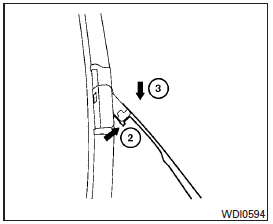
Replace the wiper blades if they are worn.
1. Lift the wiper arm away from the windshield.
2 Push the release tab, then move the wiper blade down the wiper arm to remove.
3 Remove the wiper blade.
4. Insert the new wiper blade onto the wiper arm until it clicks into place.
5. Rotate the wiper blade so the dimple is in the groove.
6. Return the wiper to its original position and release it until it has made contact with the windshield.
CAUTION
● After wiper blade replacement, return the wiper arm to its original position; otherwise it may be damaged when the hood is opened.
● Make sure the wiper blades contact the glass; otherwise the arms may be damaged from wind pressure.
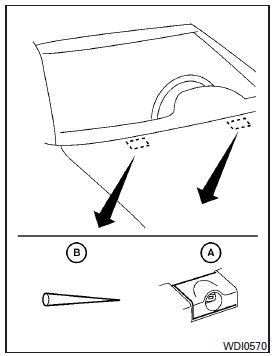
If you wax the surface of the hood, be careful not to let wax get into the windshield washer nozzle A . This may cause clogging or improper windshield washer operation. If wax gets into the nozzle, remove it with a needle or small pin B .
Rear window wiper blade
Contact an INFINITI retailer if checking or replacement is required.
See also:
Fuel Recommendation
Use unleaded premium gasoline with an octane rating of at least 91 AKI (Anti-Knock Index) number (Research octane number 96).
If unleaded premium gasoline is not available, you may use unleaded reg ...
Rapid air pressure loss
Rapid air pressure loss or a “blow-out” can occur if the tire is punctured or is damaged due to hitting a curb or pothole. Rapid air pressure loss can also be caused by driving on under-inflated tires ...
Avoiding collision and rollover
WARNING
Failure to operate this vehicle in a safe and
prudent manner may result in loss of control
or an accident.
Be alert and drive defensively at all times.
Obey all traffic regulations. ...