
Console box

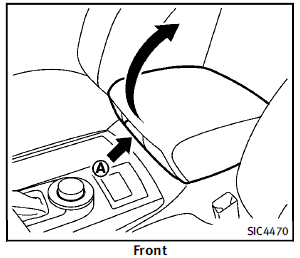
Front To open the console box, push up the knob A and pull up the lid. To close, push the lid down until latched.
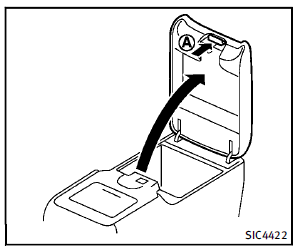
Rear (if so equipped)
To open the lid, push the knob up A and pull up the lid. To close, push the lid down until the lock latches.
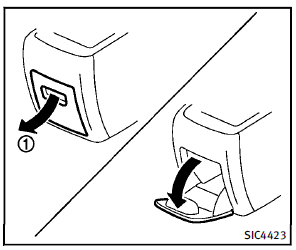
Pocket:
To open the pocket, pull the knob 1 . To close, push the lid until the lock latches.
See also:
Clutch fluid (if so equipped)
Clutch fluid (if so equipped)
Check the fluid level in the reservoir. If the fluid level is below the MIN line
1 , add Genuine NISSAN Super Heavy Duty Brake Fluid or equivalent DOT 3 fluid up to ...
Interior trunk lid release
WARNING
Closely supervise children when they are around cars to prevent them from playing and becoming locked in the trunk where they could be seriously injured. Keep the car locked, with the trunk l ...
Fuel-filler cap
WARNING
► Gasoline is extremely flammable and
highly explosive under certain conditions.
You could be burned or seriously
injured if it is misused or mishandled.
Always stop engine an ...