
Door locks/unlocks precaution
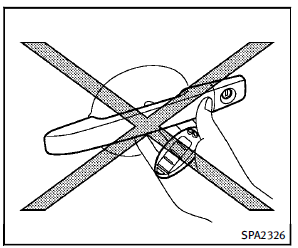
► Do not push the door handle request
switch with the Intelligent Key held in
your hand as illustrated. The close
distance to the door handle will cause
the Intelligent Key system to have
difficulty recognizing that the Intelligent
Key is outside the vehicle.
► After locking with the door handle
request switch, verify the doors are
securely locked by testing them.
► To prevent the Intelligent Key from
being left inside the vehicle, make sure
you carry the key with you and then
lock the doors.
► Do not pull the door handle before
pushing the door handle request
switch. The door will be unlocked but
will not open. Release the door handle
once and pull it again to open the door.
► The Intelligent Key system (opening/
closing doors with the door handle
request switch) can be set to remain
inactive. (See “Vehicle information and
settings” in the “4. Monitor, climate,
audio, phone and voice recognition
systems” section.)
See also:
Booster seats
Precautions on booster seats
WARNING
If a booster seat and seat belt are not used
properly, the risk of a child being injured in
a sudden stop or collision greatly increases:
► Make su ...
Unique front and rear parts (INFINITI Performance Line, Aerodynamic Package
models)
INFINITI Performance Line models
The INFINITI Performance Line models have unique exhaust pipes. These parts are close to the ground and may be damaged if they contact objects such as parking block ...
ECO mode
Adjusts engine and transmission points to enhance fuel economy.
NOTE:
Selecting this drive mode will not necessarily improve fuel economy as many driving factors influence its effectiveness.
Oper ...