
Difference between predicted and actual distances

The distance guide line and the vehicle width guide line on the front and the rearview should be used as a reference only when the vehicle is on a level, paved surface. The distance viewed on the monitor is for reference only and may be different than the actual distance between the vehicle and displayed objects.
Moving to a steep uphill
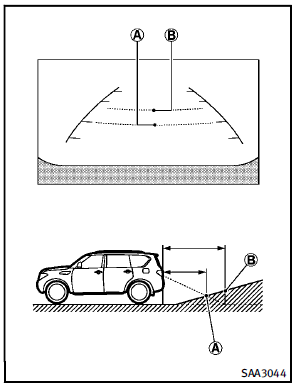
When moving the vehicle up a hill, the distance guide lines and the vehicle width guide lines are shown closer than the actual distance. For example, the display shows 3 ft (1 m) to the place A , but the actual 3 ft (1 m) distance on the hill is the placeB . Note that any object on the hill is viewed in the monitor further than it appears.
Moving to a steep downhill
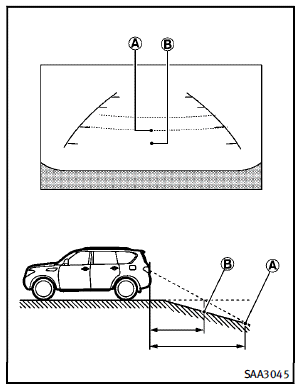
When moving the vehicle down a hill, the distance guide lines and the vehicle width guide lines are shown further than the actual distance. For example, the display shows 3 ft (1 m) to the place A , but the actual 3 ft (1 m) distance on the hill is the placeB . Note that any object on the hill is viewed in the monitor closer than it appears.
Moving near a projecting object
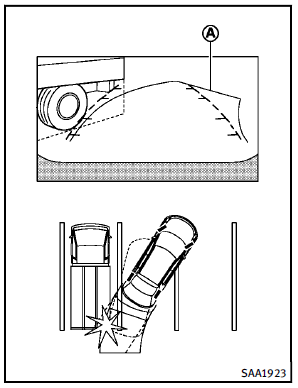
Moving closer to a projecting object
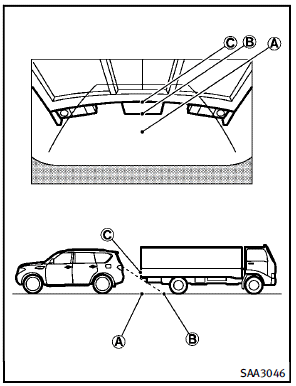
The position C is shown further than the position B in the display. However, the position C is actually at the same distance as the position A . The vehicle may hit the object when moving toward the position A if the object projects over the actual moving course.
See also:
Air conditioner system refrigerant and oil recommendations
The air conditioner system in your INFINITI vehicle must be charged with the refrigerant HFC-134a (R-134a) and the oil, NISSAN A/C system oil DH-PS or the exact equivalents.
CAUTION
The use of any ...
If your vehicle is stolen
If your vehicle is stolen, you should change the codes of any non-rolling code device that has been programmed into HomeLink®. Consult the Owner’s Manual of each device or call the manufacturer or ret ...
Overview
With the Infiniti M a new style of performance saloon - brimming with
passion, craftsmanship and driver appeal - comes to Europe in 2010 as the
world's newest luxury automotive brand Infiniti face ...