
Checking engine oil level

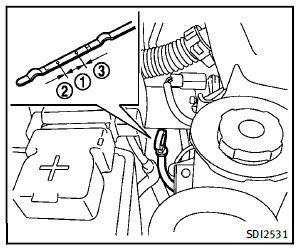
1. Park the vehicle on a level surface and apply the parking brake. 2. Run the engine until it reaches operating temperature. 3. Turn off the engine. Wait more than 15 minutes for the oil to drain back into the oil pan. 4. Remove the dipstick and wipe it clean. Reinsert it all the way. 5. Remove the dipstick again and check the oil level. It should be within the range 1 . If the oil level is below 2 , remove the oil filler cap and pour recommended oil through the opening. Do not overfill 3 . 6. Recheck oil level with the dipstick. It is normal to add some oil between oil maintenance intervals or during the breakin period, depending on the severity of operating conditions.
 CAUTION
Oil level should be checked regularly.
Operating the engine with an insufficient
amount of oil can damage the engine, and
such damage is not covered by warranty.
See also:
How to park with predicted course lines
1. Visually check that the parking space is safe before parking your vehicle.
2. The rear view of the vehicle is displayed on the screen A when the shift selector is moved to the R (Reverse) posi ...
Phone selection
Up to 5 cellular phones can be registered to the system. To switch to connect another cellular phone, push PHONE button and select the “Connected Phones” key. The registered cellular phones are shown ...
How to see each view
WARNING
► The distance guide line and the vehicle
width line should be used as a reference
only when the vehicle is on a paved,
level surface. The distance viewed on the
monitor is fo ...