
Vehicle identification number (chassis number)

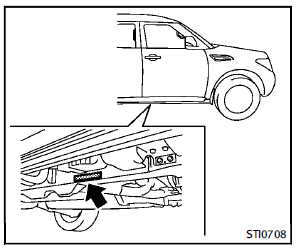
The number is stamped as shown.
See also:
Rear window and outside mirror defroster switch
To defrost the rear window glass and outside mirrors:
Start the engine and push the rear window defroster switch. The rear window defroster indicator light on the display screen comes on. Push th ...
Voice Adaptation (VA) mode
Voice Adaptation allows up to two out-of-dialect users to train the system to improve recognition accuracy. By repeating a number of commands, the users can create a voice model of their own voice tha ...
BSW/Blind Spot InterventionTM driving situations
Another vehicle approaching from
behind
The BSW/Blind Spot InterventionTM indicator
light illuminates if a vehicle enters the
detection zone from behind in an adjacent
lane.
However, if t ...