
Precautions on booster seats

WARNING
If a booster seat and seat belt are not used properly, the risk of a child being injured in a sudden stop or collision greatly increases:
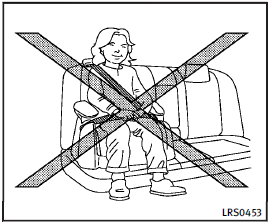
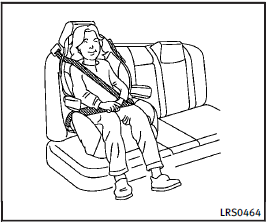
• Make sure the shoulder portion of the belt is away from the child’s face and neck and the lap portion of the belt does not cross the stomach.
• Make sure the shoulder belt is not behind the child or under the child’s arm.
• A booster seat must only be installed in a seating position that has a lap/shoulder belt.
Booster seats of various sizes are offered by several manufacturers. When selecting any booster seat, keep the following points in mind: . Choose only a booster seat with a label certifying that it complies with Federal Motor Vehicle Safety Standard 213 or Canadian Motor Vehicle Safety Standard 213.
• Check the booster seat in your vehicle to be sure it is compatible with the vehicle’s seat and seat belt system.
• Make sure the child’s head will be properly supported by the booster seat or vehicle seat. The seatback must be at or above the center of the child’s ears.
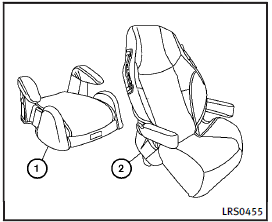
For example, if a low back booster seat 1 is chosen, the vehicle seatback must be at or above the center of the child’s ears. If the seatback is lower than the center of the child’s ears, a high back booster seat 2 should be used.
• If the booster seat is compatible with your vehicle, place your child in the booster seat and check the various adjustments to be sure the booster seat is compatible with your child.
Always follow all recommended procedures.
All U.S. states and Canadian provinces or territories require that infants and small children be restrained in an approved child restraint at all times while the vehicle is being operated.
The instructions in this section apply to booster seat installation in the rear seats or the front passenger seat.
See also:
Opening the fuel-filler door
To open the fuel-filler door, unlock the fuelfiller door by using one of the following operations, then push the right side of the door (Sedan) or push the left side of the door (Coupe).
• Push the d ...
Console box
Automatic transmission models
Manual transmission models
Coupe — Manual transmission model
To open the console boxes, push the knob A and pull up the lid.
To close, push the lid down until l ...
Sonar indicator
Sonar indicator
*1 Rear view monitor display*A Corner sonar indicator*B Center sonar indicator
With the “Sonar Display” key ON in the “Sonar” settings, when the corner/center sonar detects obstacl ...