
Indicators for maintenance

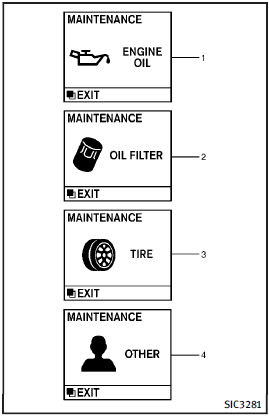
1. Engine oil replacement indicator
This indicator appears when the customer set time comes for changing the engine oil.
You can set or reset the distance for changing the engine oil. (See “Trip computer”.)
2. Oil filter replacement indicator
This indicator appears when the customer set time comes for replacing the oil filter.
You can set or reset the distance for replacing the oil filter. (See “Trip computer”.)
3. Tire replacement indicator
This indicator appears when the customer set distance comes for replacing tires. You can set or reset the distance for replacing tires. (See “Trip computer”.)
WARNING
The tire replacement indicator is not a substitute for regular tire checks, including tire pressure checks. See “Changing wheels and tires”. Many factors including tire inflation, alignment, driving habits and road conditions affect tire wear and when tires should be replaced. Setting the tire replacement indicator for a certain driving distance does not mean your tires will last that long. Use the tire replacement indicator as a guide only and always perform regular tire checks. Failure to perform regular tire checks, including tire pressure checks could result in tire failure. Serious vehicle damage could occur and may lead to a collision, which could result in serious personal injury or death.
4. “OTHER” indicator
This indicator appears when the customer set time comes for replacing items other than the engine oil, oil filter and tires. You can set or reset the distance for replacing the items. (See “Trip computer”.) More maintenance reminders are also available on the center display. (See “How to use INFO button”.)
See also:
Meters and gauges
1. Tachometer (P.2-8)
2. Warning/Indicator lights (P.2-11)
3. Speedometer (P.2-7)
4. Engine coolant temperature gauge
(P.2-8)
5. Voltmeter (P.2-10)
6. Dot matrix liquid crystal display/ ...
Keys
A key number plate is supplied with your
keys. Record the key number and keep it in
a safe place (such as your wallet), not in
the vehicle. If you lose your keys, see an
INFINITI retailer for ...