
Map lights

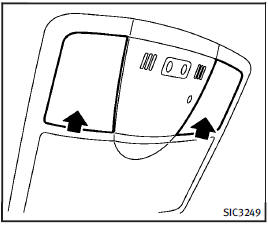
Map lights
Push the button as illustrated to turn the light on or off.
See also:
Sunglasses holder
To open the sunglasses holder, push and release1.
Only store one pair of sunglasses in the holder.
WARNING
Keep the sunglasses holder closed while driving to prevent an accident.
CAUTION
&# ...
System operation
The automatic drive positioner system will not work or will stop operating under the following conditions:
● When the vehicle speed is above 4 MPH (7 km/h).
● When any of the memory ...
Intelligent Key
Your vehicle can only be driven with the
Intelligent Keys which are registered to
your vehicle’s Intelligent Key system components
and INFINITI Vehicle Immobilizer
System components. As many a ...