
Exterior front

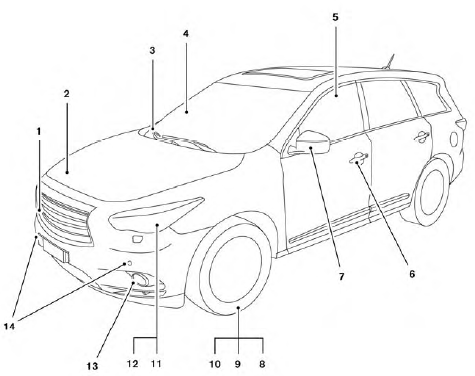
1. Front camera (if so equipped) (P. 4-36)
2. Engine hood (P. 3-22)
3. Windshield wiper and washer switch, wiper blades (P. 2-26, 8-18)
4. Windshield-washer fluid (P. 8-18)
5. Power windows (P. 2-51)
6. Door locks, INFINITI Intelligent Key, Remote Engine Start (if so equipped), keys (P. 3-5, 3-7, 3-20,3-2)
7. Mirrors, side camera (if so equipped) (P. 3-31, 4-36)
8. Tire pressure (P. 9-11)
9. Flat tire (P. 6-2)
10. Tire chains (P. 8-38)
11. Replacing bulbs (P. 8-26)
12. Headlight and turn signal switch (P. 2-30)
13. Fog light switch (P. 2-35)
14. Corner sensors (if so equipped) (P. 4-40)
See also:
Receiving a call
Receiving a call
When you hear a phone ring, the display will change to the incoming call mode. To receive a call, perform one of the following procedures listed below.
1. Select the “Answer” key. ...
Backing up behind a projecting object
Backing up behind a projecting object
The position C is shown further than the position B in the display. However, the position
C is actually at the same distance as the position A . The vehicle ...
Headlights
Replacing the xenon headlight bulb
If replacement is required, see your INFINITI retailer.
WARNING
HIGH VOLTAGE
When xenon headlights are on, they produce a high voltage. To prevent an electri ...