
Precautions on cruise control
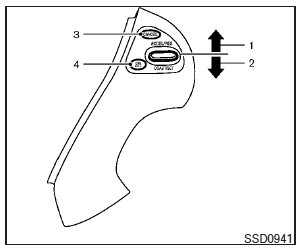
1. ACCEL/RES switch
2. COAST/SET switch
3. CANCEL switch
4. ON·OFF switch
● If the cruise control system malfunctions, it will cancel automatically. The SET indicator in the vehicle information display will blink to warn the driver.
● If the engine coolant temperature becomes excessively high, the cruise control system will be canceled automatically.
● If the SET indicator blinks, turn the cruise control main switch off and have the system checked by your INFINITI retailer.
● The SET indicator may sometimes blink when the cruise control main switch is turned ON while pushing the ACCEL/RES, COAST/SET or CANCEL switch. To properly set the cruise control system, perform the steps below in the order indicated.
WARNING
Do not use the cruise control when driving under the following conditions:
● when it is not possible to keep the vehicle at a set speed
● in heavy traffic or in traffic that varies in speed
● on winding or hilly roads
● on slippery roads (rain, snow, ice, etc.)
● in very windy areas
Doing so could cause a loss of vehicle control and result in an accident.
See also:
Precautions on seat belt usage
If you are wearing your seat belt properly adjusted, and you are sitting upright and well back in your seat with both feet on the floor, your chances of being injured or killed in an accident and/or t ...
All season tires
INFINITI specifies all season tires on some models to provide good performance all year, including snowy and icy road conditions.
All Season tires are identified by ALL SEASON and/or M&S (Mud and ...
Horn
To sound the horn, push near the horn icon of the steering wheel.
WARNING
Do not disassemble the horn. Doing so could affect proper operation of the supplemental front air bag system. Tampering ...