
Dimensions
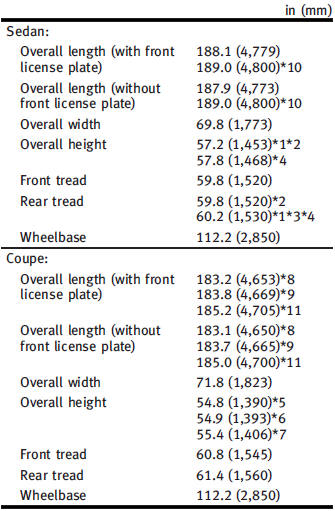
*1: Sedan/Two-Wheel Drive (2WD)/17-in tire models
*2: Sedan/Two-Wheel Drive (2WD)/18-in tire models (FR: 225/50R18,
RR:245/45R18)
*3: Sedan/Two-Wheel Drive (2WD)/18-in tire models (FR, RR: 225/50R18)
*4: Sedan/All-Wheel Drive (AWD) models *5: Coupe/Two-Wheel Drive (2WD)/18-in
tire models
*6: Coupe/Two-Wheel Drive (2WD)/19-in tire models
*7: Coupe/All-Wheel Drive (AWD) models
*8: Coupe/Standard models
*9: Coupe/Sports models
*10:Sedan/Aerodynamic Package models
*11:Coupe/INFINITI Performance Line, Aerodynamic Package models
See also:
How to use brightness control and display ON/OFF button
Push the “ OFF” button to switch
the display brightness to the daytime mode or the nighttime mode, and to adjust the display brightness using the INFINITI controller while the indicator is displayed ...
Tire dressings
INFINITI does not recommend the use of tire dressings. Tire manufacturers apply a coating to the tires to help reduce discoloration of the rubber.
If a tire dressing is applied to the tires, it may ...
Operating tips
• When the selector/shift lever is shifted to the “R” (Reverse) position, the monitor screen automatically changes to the rearview monitor mode. However, the radio can be heard.
• It may take some ti ...