
Warning systems switch (if so equipped)

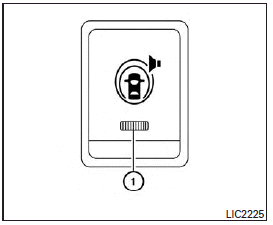
The warning systems switch is used to turn on and off the warning systems (Forward Collision Warning (FCW), Lane Departure Warning (LDW) and Blind SpotWarning (BSW) systems) that are activated using the settings menu on the center display.
When the warning systems switch is turned off, the indicator 1 on the switch is off. The indicator will also be off if all of the warning systems are deactivated using the settings menu.
TheFCWsystem will sound a warning chime and the vehicle ahead detection indicator light blinks to alert the driver if the vehicle is traveling close to the vehicle ahead. (See “Forward Collision Warning (FCW) system” in the “Starting and driving” section).
The LDW system will sound a warning chime and blink LDW/LDP indicator light (orange) to alert the driver if the vehicle is traveling close to either the left or the right of a traveling lane with detectable lane markers. (See “Lane Departure Warning (LDW) system/Lane Departure Prevention (LDP) system” in the “Starting and driving” section).
The BSW system will turn on the BSW/Blind Spot Intervention (BSI) indicator lights, located next to the outside mirrors, if the radar sensors detect a vehicle in the detection zone. If the turn signal is activated in the direction of the detected vehicle, a chime sounds twice and the BSW/BSI indicator light will flash. (See “Blind Spot Warning (BSW) system/Blind Spot Intervention™ (BSI) system” in the “Starting and driving” section).
See also:
Rear
The 2nd row outboard seats are warmed by
built-in heaters. The switches located on
the back side of the center console can be
operated independently of each other.
1. Start the engine.
...
Image viewer (if so equipped)
Using the image viewer
When a compatible portable storage device is plugged into the USB jack located in the center console, compatible image files stored on the device can be viewed on the control p ...
Setting memory function
The position of the following settings can be linked to the Intelligent Key and the memorized settings can be available for each Intelligent Key.
● Climate control system
● Navigatio ...