
Luggage hooks

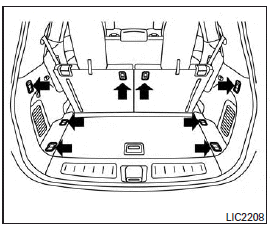
When securing items using luggage hooks located on the back of the seat or side finisher do not apply a load over more than 6.5 lbs (29 N) to a single hook.
The luggage hooks that are located on the floor should have loads less then 110 lbs (490 N) to a single hook.
The luggage hooks can be used to secure cargo with ropes or other types of straps.
WARNING
● Properly secure all cargo with ropes or straps to help prevent it from sliding or shifting. Do not place cargo higher than the seatbacks. In a sudden stop or collision, unsecured cargo could cause personal injury.
● Use suitable ropes and hooks to secure cargo.
● Never allow anyone to ride in the luggage area. It is extremely dangerous to ride in a cargo area inside of a vehicle.
In a collision, people riding in these areas are more likely to be seriously injured or killed.
● Do not allow people to ride in any area of your vehicle that is not equipped with seats and seat belts.
● The child restraint top tether strap may be damaged by contact with items in the cargo area. Secure any items in the cargo area. Your child could be seriously injured or killed in a collision if the top tether strap is damaged.
● Be sure everyone in your vehicle is in a seat and using a seat belt properly.
See also:
Indicator lights
Adaptive Front lighting System
(AFS) indicator light (if so
equipped)
When the ignition switch is pushed to the
ON position, the Adaptive Front lighting
System (AFS) indicator light will ill ...
Antifreeze
In the winter when it is anticipated that the
outside temperature will drop below 328F
(08C), check antifreeze to assure proper
winter protection. For additional information,
see “Engine cooli ...
How to change the set distance to thevehicle ahead
The distance to the vehicle ahead can be selected at any time depending on the traffic conditions.
Each time the distance switch A is pushed, the set distance will change to long, average, short ...