
Entering from the side

The Blind spot warning indicator light illuminates if a vehicle enters the detection zone from either side.
NOTE:
The radar sensors may not detect a vehicle which is traveling at about the same speed as your vehicle when it enters the detection zone.
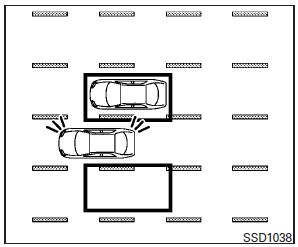
If the driver activates the turn signal, then the Blind spot warning indicator light flashes and a chime will sound twice.
NOTE:
If the driver activates the turn signal before a vehicle enters the detection zone, the Blind spot warning indicator light will flash but no chime will sound when another vehicle is detected.
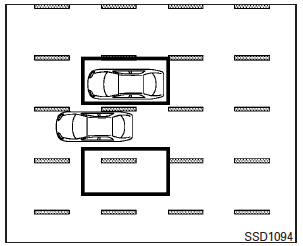
If the BSI system is on and your vehicle approaches the lane marker while another vehicle is in the detection zone, the Blind spot warning indicator light flashes and a chime will sound three times. Then, the BSI system slightly applies the brakes on one side to help return the vehicle back to the center of the driving lane.
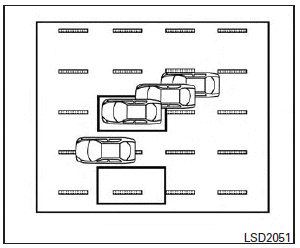
NOTE:
● The BSI system will not operate if your vehicle is on a lane marker when another vehicle enters the detection zone. In this case only the BSW system operates.
● BSI braking will not operate or will stop operating and only a warning chime will sound under the following conditions.
– When the brake pedal is depressed.
– When the accelerator pedal is depressed while brake control assist is provided.
– When steering quickly.
– When the ICC, DCA, FCW or IBA warnings sound.
– When the hazard warning flashers are operated.
– When driving on a curve at a high speed.
See also:
Using the panic alarm
If you are near your vehicle and feel threatened, you may activate the panic alarm to call attention by pressing and holding the button
on the Intelligent Key for longer than 0.5 seconds.
The ...
Active Noise Control (ANC)
By identifying undesirable sounds in the cabin and then playing back through
the speakers sound waves of opposite phase, the original noises are cancelled
out, making the M's interior a quieter, m ...
Active trace control (if so equipped)
This system senses driving based on the driver’s steering and acceleration/braking patterns, and controls brake pressure at individual wheels to help smooth vehicle response.
When the VDC OFF switc ...