
Rain-sensing auto wiper system

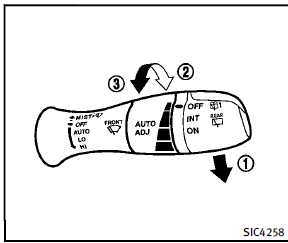
The rain-sensing auto wiper system can automatically turn on the wipers and adjust the wiper speed depending on the rainfall and the vehicle speed by using the rain sensor located on the upper part of the windshield. To set the rain-sensing auto wiper system, push the lever down to the AUTO position 1 . The wiper will sweep once while the ignition switch is in the ON position. The rain sensor sensitivity level can be adjusted by turning the knob toward the front 2 (High) or toward the rear 3 (Low).
► High — High sensitive operation
► Low — Low sensitive operation
To turn the rain-sensing auto wiper system off, push up the lever to the OFF position, or pull down the lever to the LO or HI position.
 CAUTION
Do not touch the rain sensor and around it
when the wiper switch is in the AUTO
position and the ignition switch is in the
ON position. The wipers may operate unexpectedly
and cause to an injury or a wiper
damage.
► The rain-sensing auto wipers are intended
for use during rain. If the switch
is left in the AUTO position, the wipers
may operate unexpectedly when dirt,
fingerprints, oil film or insects are
stuck on or around the sensor. The
wipers may also operate when exhaust
gas or moisture affect the rain sensor.
► The rain-sensing auto wipers may not
operate if rain does not hit the rain sensor even if it is raining.
► When the windshield glass is coated
with water repellent, the speed of the
rain-sensing auto wipers may be higher
even though the amount of the
rainfall is small.
► Be sure to turn off the rain-sensing
auto wiper system when you use a car
wash.
► Using genuine wiper blades is recommended
for proper operation of the
rain-sensing auto wiper system. (See
“Windshield wiper blades” in the “8.
Maintenance and do-it-yourself” section
for wiper blade replacement.)
See also:
Changing a flat tire
If you have a flat tire, follow the instructions
below.
Stopping the vehicle
1. Safely move the vehicle off the road
and away from traffic.
2. Turn on the hazard warning flashers.
3. Park on ...
Off-road recovery
If the right side or left side wheels unintentionally leave the road surface, maintain control of the vehicle by following the procedure below. Please note that this procedure is only a general guide. ...
Reporting safety defects
For USA
If you believe that your vehicle has a defect which could cause a crash or could cause injury or death, you should immediately inform the National Highway Traffic Safety Administration (NHTSA ...