
Tray

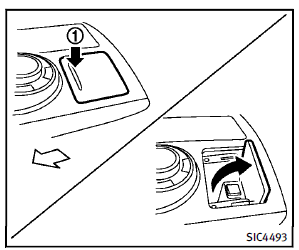
To open the tray, push the lid1 . To close, push the lid down. The USB and/or iPod® connector port is located inside the tray. (See “Audio system” in the “4. Monitor, climate, audio, phone and voice recognition systems” section or “iPod® player operation” in the “4. Monitor, climate, audio, phone and voice recognition systems” section.)
See also:
Audio main operation
Head unit:
The auto loudness circuit enhances the low and high frequency ranges automatically in both radio reception and CD playback.
ON·OFF/Volume control:
Push the ignition switch to the ACC or ...
Instrument panel
1. Vent (P. 4-52)
2. Headlight/fog light/turn signal switch (P. 2-30)
3. Instrument brightness control (P. 2-34)
4. Meters, gauges, warning/indicator lights and Vehicle Information Displa ...
Engine block heater (if so equipped)
Engine block heaters are used to assist with cold temperature starting.
The engine block heater should be used when the outside temperature is 20°F (27°C) or lower.
WARNING
● Do not use y ...