
Vehicle recovery (freeing a stuck vehicle)

 WARNING
► Stand clear of a stuck vehicle.
► Do not spin your tires at high speed. This
could cause them to explode and result
in serious injury. Parts of your vehicle
could also overheat and be damaged.
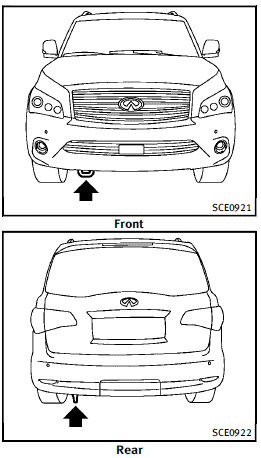
Pulling a stuck vehicle
If your vehicle is stuck in sand, snow, mud, etc., use a tow strap or other device designed specifically for vehicle recovery. Always follow the manufacturer’s instructions for the recovery device. Attach the tow strap to the recovery hook.
 CAUTION
► Tow chains or cables must be attached
only to the main structural members of
the vehicle or the towing hooks. Otherwise,
the vehicle body will be damaged.
► Use the towing hook only to free a
vehicle stuck in sand, snow, mud, etc.
Never tow the vehicle for a long distance
using only the towing hook.
► The towing hook is under tremendous
force when used to free a stuck vehicle.
Never pull the hook at an angle.
► Always pull the cable straight out from
the front or rear of the vehicle.
► Pulling devices should be routed so they
do not touch any part of the suspension,
steering, brake or cooling systems.
► Pulling devices such as ropes or canvas
straps are not recommended for use in
vehicle towing or recovery.
Rocking a stuck vehicle
If your vehicle is stuck in sand, snow, mud,
etc., use the following procedure:
1. Turn off the Vehicle Dynamic Control
(VDC) system.
2. Make sure the area in front and behind
the vehicle is clear of obstructions.
3. Turn the steering wheel right and left to
clear an area around the front tires.
4. Slowly rock the vehicle forward and
backward.
► Shift back and forth between R
(Reverse) and D (Drive).
► Apply the accelerator as little as
possible to maintain the rocking
motion.
► Release the accelerator pedal before
shifting between R and D.
► Do not spin the tires above 35 MPH
(55 km/h).
5. If the vehicle cannot be freed after a
few tries, contact a professional towing
service to remove the vehicle.
See also:
Adaptive shift control (ASC)
The adaptive shift control system automatically operates when the transmission is in the "D" (drive) and "DS" (Drive Sport) position and selects an appropriate gear depending on th ...
Phone selection
Up to 5 cellular phones can be registered to the system. To switch to connect another cellular phone, push PHONE button and select the “Connected Phones” key. The registered cellular phones are shown ...
Entering from the side
The Blind spot warning indicator light illuminates if a vehicle enters the detection zone from either side.
NOTE:
The radar sensors may not detect a vehicle which is traveling at about the same sp ...