
Shifting

Shifting
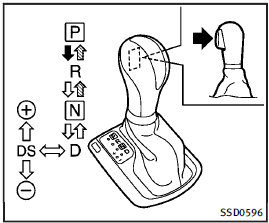
To move the selector lever,
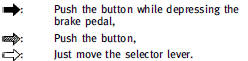
After starting the engine, fully depress the brake pedal and shift the selector lever from P (Park) to R (Reverse), N (Neutral), D (Drive), DS (Drive Sport) or Manual shift mode position.
Push the button to shift into P (Park) or R (Reverse). All other positions can be selected without pushing the button.
WARNING
Apply the parking brake if the selector lever is in any position while the engine is not running. Failure to do so could cause the vehicle to move unexpectedly or roll away and result in serious personal injury or property damage.
CAUTION
Make sure the vehicle is completely stopped and the transmission is in the P (Park) position.
P (Park) position:
Use this selector position when the vehicle is parked or when starting the engine.
Make sure the vehicle is completely stopped. The brake pedal must be depressed and the selector lever button pushed in to move the selector lever from the N (Neutral) position or any drive position to the P (Park) position. Apply the parking brake. When parking on a hill, apply the parking brake first, then move the selector lever to the P (Park) position.
CAUTION
Use this position only when the vehicle is completely stopped.
R (Reverse):
Use this position to back up. Always be sure the vehicle is completely stopped before selecting the R (Reverse) position.
The brake pedal must be depressed and the selector lever button pushed in to move the selector lever from the P (Park) position, the N (Neutral) position or any drive position to the R (Reverse) position.
N (Neutral):
Neither forward nor reverse gear is engaged.
The engine can be started in this position. You may shift to the N (Neutral) position and restart a stalled engine while the vehicle is moving.
D (Drive):
Use this position for all normal forward driving.
See also:
Parking/parking on hills
WARNING
► Do not stop or park the vehicle over
flammable materials such as dry grass,
waste paper or rags. They may ignite and
cause a fire.
► Never leave the engine running w ...
Servicing climate control
The climate control system in your INFINITI is charged with a refrigerant designed with the environment in mind. This refrigerant will not harm the earth’s ozone layer.
However, special charging equi ...
Automatic transmission models
Automatic transmission models
To apply: Fully depress the parking brake pedal 1 .
To release:
1. Firmly apply the foot brake 2 .
2. Depress the parking brake pedal 1 and the parking brake will b ...