
Brake fluid
For further brake fluid specification information, see “Capacities and recommended fuel/lubricants” in the “9. Technical and consumer information” section of this manual.
 WARNING
► Use only new fluid from a sealed
container. Old, inferior or contaminated
fluid may damage the brake system. The
use of improper fluids can damage the
brake system and affect the vehicle’s
stopping ability.
► Be sure to clean the filler cap before
removing.
► Brake fluid is poisonous and should be
stored carefully in marked containers out
of the reach of children.
 CAUTION
► Do not add brake fluid with the ignition
switch in the “ON” position or the
engine running. Doing so could make
the brake fluid overfill when the ignition
switch is turned off.
► Do not spill the fluid on painted
surfaces. This will damage the paint. If
fluid is spilled, wash the surface with
water.
Brake fluid
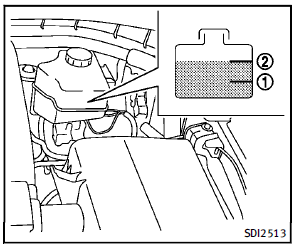
Check the fluid level in the reservoir. If the fluid is below the MIN line1 or the brake warning light comes on, add Genuine NISSAN Super Heavy Duty Brake Fluid or equivalent DOT 3 fluid up to the MAX line 2 . To add brake fluid: 1. Be sure the ignition switch is in the OFF or LOCK position. 2. Depress and release the foot brake pedal more than 40 times. 3. Open the reservoir filler cap and add brake fluid up to the MAX line2 . (See “Capacities and recommended fuel/ lubricants” in the “9. Technical and consumer information” section for the recommended types of brake fluid.)
NOTE:
When the ignition switch is placed in the “ON” position after adding brake fluid up to the MAX line 2 in the reservoir, the brake fluid decreases below the MAX line 2 . This is normal. If fluid must be added frequently, the system should be checked by an INFINITI retailer.
See also:
Inside the vehicle
The maintenance items listed here should be checked on a regular basis, such as when performing periodic maintenance, cleaning the vehicle, etc.
Accelerator pedal: Check the pedal for smooth operatio ...
Steering-wheel-mounted controls for audio
Menu control switch
While the display is showing a MAP,
STATUS or Audio screen, tilt the switch
upward or downward to select a station,
track, CD or folder. For most audio sources,
tilting th ...
Jacking up the vehicle and removing the damaged tire
WARNING
• Never get under the vehicle while it is supported only by the jack. If it is necessary to work under the vehicle, support it with safety stands.• Use only the jack provided with your vehicl ...