
Turn signal switch

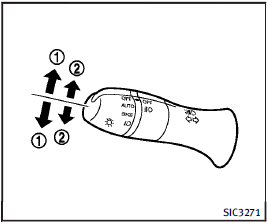
Turn signal switch
1 Turn signal
Move the lever up or down to signal the turning direction. When the turn is completed, the turn signals cancel automatically.
2 Lane change signal
To indicate a lane change, move the lever up or down to the point where lights begin flashing.
See also:
Seat synchronization function
The seat synchronization function automatically adjusts the positions of the steering wheel and outside mirrors when the seat is adjusted using the power seat switches.
However, the steering wheel ...
Compact disc (CD) player operation
Place the ignition in the ACC or ON position and insert the compact disc into the slot with the label side facing up. The compact disc will be guided automatically into the slot and start playing.
...
Vehicle loading information
WARNING
► It is extremely dangerous to ride
in a cargo area inside the vehicle.
In a collision, people riding in
these areas are more likely to be
seriously injured or killed.
υ ...