
Locking with inside lock knob

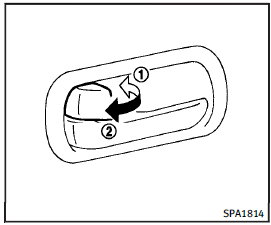
Locking with inside lock knob
To lock the door individually, move the inside lock knob to the lock position 1 then close the door.
To unlock, move the inside lock knob to the unlock position 2 .
When locking the door without an Intelligent Key, be sure not to leave the Intelligent Key inside the vehicle.
See also:
Xenon headlights
WARNING
HIGH VOLTAGE• When xenon headlights are on, they produce a high voltage. To prevent an electric shock, never attempt to modify or disassemble. Always have your xenon headlights replaced at a ...
Music Box® (if so equipped)
Recording:
• Note that data that is lost and not stored to the hard drive/flash memory due to system damage, improper operation or malfunction is not under warranty.
• Vehicle owners are not permitt ...
Audible reminders
Brake pad wear warning
The disc brake pads have audible wear warnings.
When a disc brake pad requires replacement, it makes a high pitched scraping sound when the vehicle is in motion, whether or ...