
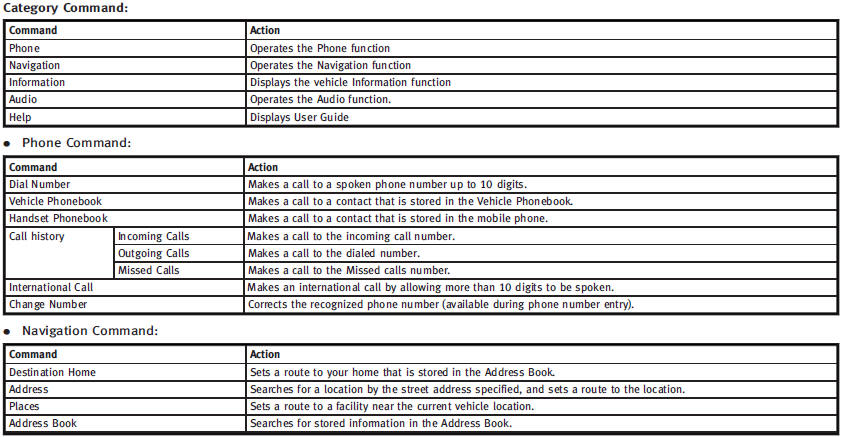
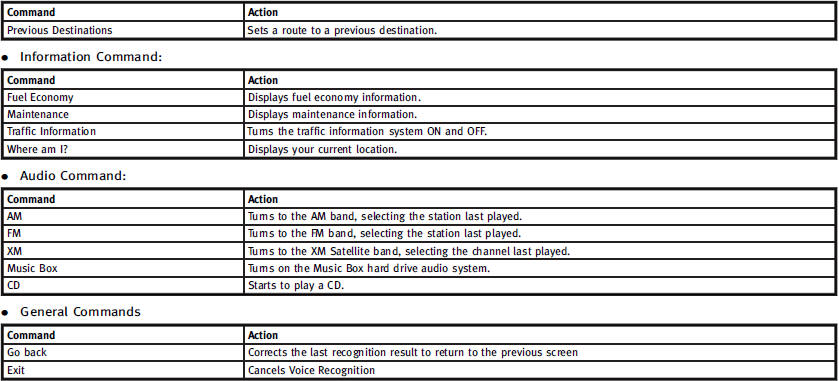
Command List

See also:
Interior
The interior of the FX is right in line with most current Infinitis, like the
G and M sedans, but I thought it should have been a bit fancier, like the new
EX35 crossover that debuted earlier this ...
Installing child restraint LATCH
lower anchor attachments
LATCH webbing-mounted attachment
LATCH compatible child restraints include
two rigid or webbing-mounted attachments
that can be connected to anchors located
at certain seating positions in ...
Locking with inside lock knob
Locking with inside lock knob
To lock the door individually, move the inside lock knob to the lock position
1 then close the door.
To unlock, move the inside lock knob to the unlock position 2 . ...